WordPress 標準のテーマにも備わっているスタイルバリエーション機能。
下図のように、ボタン一発でスタイルの変更ができ、いわゆるサイトデザインの着せ替えができる機能です。
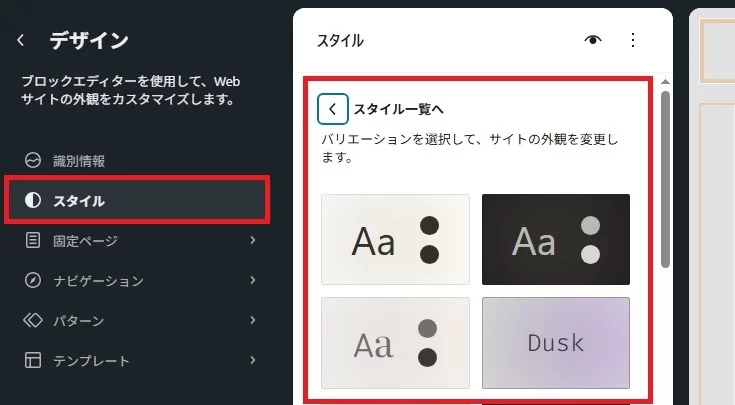
本サイトで配布している HA Canvas テーマもシンプルシンプルと言いながら、この機能はとても便利なので取り入れています。
バリエーションを追加するのは比較的簡単にできますので、自作テーマで運用している方は追加してみてください。
1.スタイルバリエーション用のディレクトリやファイルを作る
ブロックテーマでは、以下のようにテーマディレクトリの中に「styles」というディレクトリを作り、それ用のtheme.jsonを設置することで、自動できにスタイルバリエーションとして認識されるようになっています。
- テーマディレクトリ
- style.css
- functions.php
- styles
- 〇〇.json
- 〇〇.json
- …その他必要なディレクトリやファイル
上記の中の「〇〇.json」を任意の名前にして、標準のtheme.jsonの値を上書きしたり、追加したいものを記述すれば完成です。
ちなみに以下が、本サイトでも使っている HA Canvas テーマの「Ha Light Desktop」というスタイルバリエーションのtheme.jsonの内容です。
{
	"$schema": "https://schemas.wp.org/wp/7.1/theme.json",
	"version": 3,
	"title": "Ha Light Desktop",
	"styles": {
		"background": {
			"backgroundAttachment": "fixed",
			"backgroundImage": {
				"source": "theme",
				"url": "file:./images/light-desktop.webp"
			},
			"backgroundSize": "cover",
			"backgroundPosition": "50% 50%"
		},
		"color": {
			"background": "#ffffff"
		},
		"typography": {
			"fontFamily": "var(--wp--preset--font-family--ha-default-fonts)"
		}
	},
	"settings": {
		"custom": {
			"theme-info": {
				"current-slug": "ha-light-desktop"
			}
		}
	}
}
これを追加するには決まりが2つあります。
1つめは、jsonファイルの名前とjsonファイル内の「current-slug」の名前を一緒にすることです。
2つめは、「title」に他と混同しないように名前を付けることです。
スタイルバリエーション用のjsonファイルを作る方法には大きく以下の3通りがあります。
標準のtheme.jsonをコピーして書き換える
一番スタンダードな方法ですが、実は一番大変な方法でもあります。
スタイルバリエーション用のjsonは、標準のtheme.jsonと同一のものがあったら無視する、値が違うものがあれば置き換える、追加されているものがあれば適用させるといった判断と動作をアクセスがある度に繰り返します。パフォーマンスのことを考えると極力同一のものは排し、変更や追加のあるものを記述するのがベターですし、何より同一のものを両方に持たせることで、標準のtheme.json側の変更を行った場合にそのスタイルバリエーションでは反映されないという不都合が発生しないようにするためには必要だと思います。
が、json形式のファイルはPHPやCSSのようにコード中にコメントが残せないこと、括弧や記号の使い方などが厳密で、1つでも間違っているとすべて適用されないことなど、慣れていないと不具合を起こす原因にもなっていまいますので、個人的にこの方法はあまりおすすめしません。
サイトエディターで作成して書き換える
この方法は実用的であるものの、現在カスタマイズしている内容が消失する可能性がありますので、現在のテーマのバックアップと取って後から元に戻すか、テスト用のサイトなどで行うようにしてください(詳しくは本章末尾の注意事項を読んでください)
まずは以下のようなほぼ空のjsonファイルを用意し、名前やファイル名を任意のものにした上でテーマディレクトリの「styles」ディレクトリ内に設置します。
{
	"$schema": "https://schemas.wp.org/wp/7.1/theme.json",
	"version": 3,
	"title": "スタイルバリエーションの名前",
	"styles": {
	},
	"settings": {
		"custom": {
			"theme-info": {
				"current-slug": "スタイルバリエーションファイル名のスラグと同一の文字列"
			}
		}
	}
}
正常に認識されれば、サイトエディターの「スタイル」を選択して「スタイルの一覧を表示」をクリックした時に、スタイルとして選択可能になります
そのスタイルを選択した状態で、いろいろと必要なカスタマイズを行います。
終わったら一旦「〇件のレビューを保存」をクリックして編集内容を確定します。
下図のようにしてテーマのエクスポートを行います。
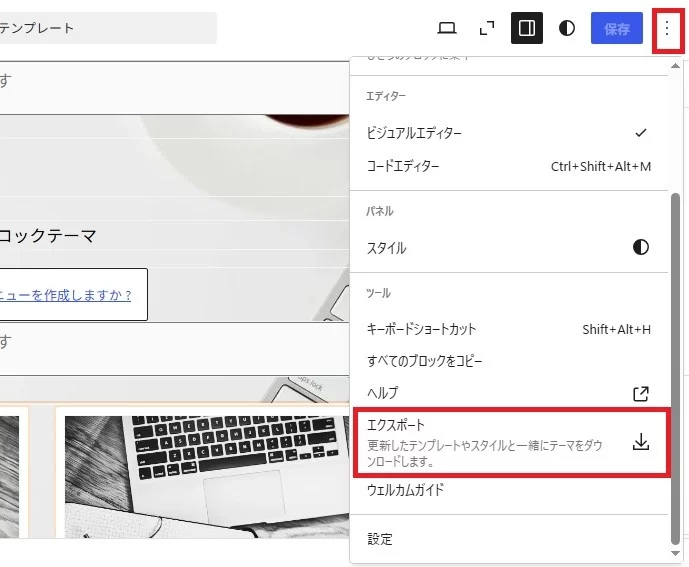
エクスポートしたファイルを解凍し、theme.jsonを取り出します。
上記のjsonの例のように、名前の指定部分と以下のsettingsプロパティの中に記述する部分を追加して保存します。
{
	"title": "スタイルバリエーションの名前",
	"settings": {
		"custom": {
			"theme-info": {
				"current-slug": "スタイルバリエーションファイル名のスラグと同一の文字列"
			}
		}
	}
}
ファイル名を「current-slug」で指定した文字列と同じに変更したら、テーマディレクトリの「styles」ディレクトリの中のファイルと入れ替えます。
正常に認識されていれば、サイトエディターをリロードしてもきちんとカスタマイズしたもので維持されるはずです。
この方法でスタイルバリエーションを追加する場合の注意点
この方法が恐らく一番現実的だと思いますが、以下の点に注意が必要です。
1.スタイルバリエーション選択前に必ずテーマのバックアップを取る
ブロックテーマは、サイトエディターで編集したものを一旦データベース内のデータとして保存して利用します。そしてスタイルバリエーション用のカスタマイズデータかどうかという判定はなく、そのテーマのカスタマイズデータとして保存されます。
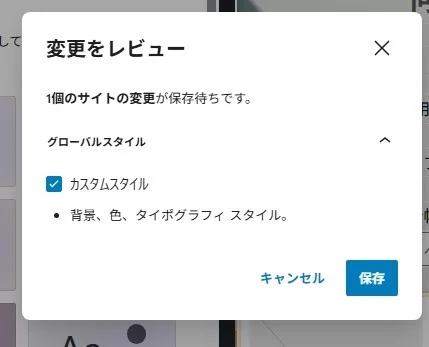
スタイルバリエーション選択後(またはスタイルバリエーションではなく標準に戻す場合)に保存(〇個のレビューを保存)をクリックした際に以下のような画面が出た場合には、今までカスタマイズして保存したデータがあった場合破棄されてしまいますので、元の状態に戻せるよう一旦キャンセルしてテーマのバックアップ(エクスポートによるバックアップ等)を行い、復元できるようにしておいてください。
2.スタイルバリエーション選択後にカスタマイズしたものをエクスポートする場合は
テーマのエクスポート機能は「現状の状態をテーマファイルとして保存する」機能なので、スタイルバリエーションを選択してカスタマイズ後に保存したものをエクスポートした場合、その状態がダウンロードしたテーマファイルでは標準となります。
これによって標準の状態が変化してしまったり、どれが標準なのかが分からなくなったりしてしまうことがありますのでご注意ください。
theme.jsonのダウンロードのみを行う機能を追加する
スタイルバリエーションで指定するスタイルは、サイトエディターで変更を行ったもの、すなわちエクスポートした時にtheme.json内のコードとして保存されるものがほとんどです(100%と言っても間違いはないでしょう)。
つまり、このスタイルバリエーション用のファイルを、ファイル名やバリエーションの名前なども保持した状態でそのままダウンロードできれば、パソコン上で加工することもありませんから、そのままテーマディレクトリ内のファイルと置き換えるだけでそのスタイルの最新の状態にすることができます。
またダウンロード後に標準状態に戻したとしても、スタイルバリエーション用のjsonの内容が失われることがないため、運営上も安心かと思います。
以下のコードをテーマのfunctions.phpへ追加することで「外観」メニュー内に「スタイルバリエーション用のjsonファイル出力」という項目が追加され、それを通じて現在編集しているバリエーション用のjsonファイルをいつでもダウンロードできるようになります。
これはHA Canvasに追加しているものと同一のコードであり、settingsプロパティの内容は破棄してstylesプロパティの中身のみを新たなjsonファイルとしてダウンロードできるようになるものです。これは前述した通りsettingプロパティの内容はサイト共通のものとしてtheme.jsonで一括管理すべきものであるという概念でそうしているもので、もしもsetting項目を含めてダウンロードさせたいという場合にはご自身でコードの編集を行ってください。
また、コード中の関数名やテキストドメインなどもそのままにしていますので、ご自身のテーマに合わせて書き換えてください。
/*****スタイルバリエーション選択時にスタイル用のtheme.jsonを生成してダウンロードする *****/
/* データベースの生の post_content からエディター同期用の theme-info メタデータを解析 */
/*スタイルバリエーション選択時のみ「styles/〇〇.json」専用のクリーンなファイルを自動生成する */
/* 「外観」メニュー内の「スタイルバリエーション用jsonファイル出力」から生成 */

/***  管理画面にメニューを追加 ***/
function ha_canvas_custom_theme_json_download_menu() {
	$menu_title = __('Output JSON file for style variations','ha-canvas');

	add_theme_page(
		$menu_title,
		$menu_title,
		'edit_theme_options', //テーマ編集が可能な権限を持つユーザーのみに表示
		'ha-canvas-download-theme-json',
		'ha_canvas_custom_theme_json_download_page'
	);
}
add_action('admin_menu', 'ha_canvas_custom_theme_json_download_menu');

/*** DB(wp_posts)から、現在のテーマの生のグローバルスタイル投稿を取得する補助関数 ***/
function ha_canvas_custom_get_raw_global_styles_post_data() {
	$theme_slug = get_stylesheet(); // 現在のアクティブテーマ名
	$post_name = 'wp-global-styles-' . $theme_slug;

	$global_style_post = get_page_by_path($post_name, OBJECT, 'wp_global_styles');

	if (!$global_style_post) {
		$posts = get_posts(array(
			'name' => $post_name,
			'post_type' => 'wp_global_styles',
			'post_status' => 'publish',
			'posts_per_page' => 1,
		));

		if (!empty($posts)) {
			$global_style_post = $posts[0];
		}
	}

	return $global_style_post;
}

/*** ダウンロード処理(スタイルバリエーション専用) ***/
function custom_theme_json_download_handler() {
	if (isset($_GET['page']) && $_GET['page'] === 'ha-canvas-download-theme-json' && isset($_GET['action']) && $_GET['action'] === 'download') {

		if (!current_user_can('edit_theme_options')) {
			$error_text = __('You do not have permission to perform this operation.','ha-canvas');
			wp_die( esc_html($error_text) );
		}

		$global_style_post = ha_canvas_custom_get_raw_global_styles_post_data();

		$raw_db_data = array();

		if ($global_style_post && !empty($global_style_post->post_content)) {
			$raw_db_data = json_decode($global_style_post->post_content, true);
		}

		if (!is_array($raw_db_data)) {
			$raw_db_data = array();
		}

		// 生データ内のメタ情報から、アクティブなスタイルバリエーション名(スラッグ)を自動特定
		$active_slug = '';

		if (isset($raw_db_data['settings']['custom']['theme-info']['current-slug'])) {
			$active_slug = sanitize_file_name($raw_db_data['settings']['custom']['theme-info']['current-slug']);
		} elseif (isset($raw_db_data['slug'])) {
			$active_slug = sanitize_file_name($raw_db_data['slug']);
		}

		// スタイルバリエーションが特定できない(デフォルト状態の)場合は処理を中断
		if (empty($active_slug) || $active_slug === 'theme') {
			$error_message = __('No style variation is currently selected. To export the base themes `theme.json`, please use the standard WordPress export function.','ha-canvas');

			wp_die( esc_html($error_message) );
		}

		$target_file = $active_slug . '.json';

		// --- コアからスキーマとバージョンを自動取得(動的判定) ---
		$default_version = 3;
		$default_schema  = 'https://schemas.wp.org/trunk/theme.json';

		if (isset($raw_db_data['version'])) {
			$default_version = (int) $raw_db_data['version'];
		}

		if (class_exists('WP_Theme_JSON_Resolver')) {
			$core_theme_json = WP_Theme_JSON_Resolver::get_core_data();

			if (method_exists($core_theme_json, 'get_raw_data')) {
				$core_raw = $core_theme_json->get_raw_data();

				if (isset($core_raw['version'])) {
					$default_version = (int) $core_raw['version'];
				}
			}
		}

		global $wp_version;
		$version_parts = explode('.', $wp_version);
		if (count($version_parts) >= 2) {
			$major_version = $version_parts[0] . '.' . $version_parts[1];
			$default_schema = "https://schemas.wp.org/wp/{$major_version}/theme.json";
		}

		// --- スタイルバリエーション用の構造を再ビルド ---
		$final_output = array(
			'$schema' => $default_schema,
			'version' => $default_version,
			'title'   => ucwords(str_replace(array('-', '_'), ' ', $active_slug)),
		);

		// テーマ内に既存の同名バリエーションファイルがあれば、元のタイトル定義を引き継ぐ
		$variation_file_path = get_stylesheet_directory() . '/styles/' . $target_file;
		if (file_exists($variation_file_path)) {
			$orig_content = json_decode(file_get_contents($variation_file_path), true);
			if (is_array($orig_content) && isset($orig_content['title'])) {
				$final_output['title'] = $orig_content['title'];
			}
		}

		// 必要不可欠な「styles」の移植
		if (isset($raw_db_data['styles'])) {
			$final_output['styles'] = $raw_db_data['styles'];
		}

		// 「settings」と「theme-info」を確実に生成・保持して移植
		$final_output['settings'] = isset($raw_db_data['settings']) ? $raw_db_data['settings'] : array();
		if (!isset($final_output['settings']['custom'])) {
			$final_output['settings']['custom'] = array();
		}
		if (!isset($final_output['settings']['custom']['theme-info'])) {
			$final_output['settings']['custom']['theme-info'] = array();
		}

		$final_output['settings']['custom']['theme-info']['current-slug'] = $active_slug;

		// 余計な内部一時ゴミフラグをクリーンアップ
		unset($final_output['slug']);
		unset($final_output['is_merged']);

		// JSONに整形
		$json_output = json_encode($final_output, JSON_PRETTY_PRINT | JSON_UNESCAPED_SLASHES | JSON_UNESCAPED_UNICODE);

		// HTTPヘッダーでダウンロードを強制
		header('Content-Type: application/json; charset=utf-8');
		header('Content-Disposition: attachment; filename="' . $target_file . '"');
		header('Pragma: no-cache');
		header('Expires: 0');

		echo $json_output;
		exit;
	}
}
add_action('admin_init', 'custom_theme_json_download_handler');

/*** 管理画面のUI表示 ***/
function ha_canvas_custom_theme_json_download_page() {
	$global_style_post = ha_canvas_custom_get_raw_global_styles_post_data();

	$detected_slug = '';
	if ($global_style_post && !empty($global_style_post->post_content)) {
		$raw_db_data = json_decode($global_style_post->post_content, true);
		if (is_array($raw_db_data)) {
			if (isset($raw_db_data['settings']['custom']['theme-info']['current-slug'])) {
				$detected_slug = sanitize_file_name($raw_db_data['settings']['custom']['theme-info']['current-slug']);
			} elseif (isset($raw_db_data['slug'])) {
				$detected_slug = sanitize_file_name($raw_db_data['slug']);
			}
		}
	}

	// バリエーションが選択されているか判定
	$is_variation_active = (!empty($detected_slug) && $detected_slug !== 'theme');

	//文字列を変数化
	$text_a = __('[HA CANVAS] Generate and download theme.json for style variations','ha-canvas');
	$text_b = __('This is a feature exclusive to the HA Canvas theme that automatically generates a JSON file dedicated to the style variations selected and customized in the site editor.','ha-canvas');
	$text_c = __('After generating the JSON file, please upload it to the following location.','ha-canvas');
	$text_d = __('Analysis of the current custom configuration','ha-canvas');
	$text_e = __('Detected style name:','ha-canvas');
	$text_f = __('Types to be exported:','ha-canvas');
	$text_g = __('Style Variations (for Overwriting/Updating)','ha-canvas');
	$text_h = __('Confirmed file name:','ha-canvas');
	$text_i = __('Recommended placement:','ha-canvas');
	$text_j = __('Inside the directory','ha-canvas');
	$text_k = __('To maintain synchronization with the standard theme.json settings, the output JSON file includes only the configuration elements required for variation recognition and the style elements specific to this variation.','ha-canvas');
	$text_l = __('Download the latest file','ha-canvas');

	$text_aa = __('Style variation not selected.','ha-canvas');
	$text_ab = __('Currently, I am customizing the theme directly from its default state, rather than editing based on a specific style variation.','ha-canvas');
	$text_ac = __('Please obtain the theme.json file in this state using the following method.','ha-canvas');
	$text_ad = __('Open the Site Editor (Appearance > Editor).','ha-canvas');
	$text_ae = __('Click the three dots (...) in the top-right corner of the screen.','ha-canvas');
	$text_af = __('Click "Export" at the bottom of the menu.','ha-canvas');
	$text_ag = __('The `theme.json` file inside the downloaded ZIP archive is the latest version, incorporating all current changes. Please place it directly in the themes root directory.','ha-canvas');
	$text_ah = __('Download not available because no style variation has been selected.','ha-canvas');

?>
<div class="wrap">
	<h1><?php esc_html_e( $text_a ); ?></h1>
	<p><?php esc_html_e( $text_b ); ?></p>
	<p><?php esc_html_e( $text_c ); ?><code>styles/〇〇.json</code></p>
	<div class="card" style="margin-top: 20px; max-width: 600px; padding: 20px;">
		<h2><?php esc_html_e( $text_d ); ?></h2>

		<?php if ($is_variation_active) : ?>
			<table class="wp-list-table widefat fixed striped" style="margin: 20px 0;">
				<tbody>
					<tr>
						<td style="width: 180px;"><strong><?php esc_html_e( $text_e); ?></strong></td>
						<td><code><?php echo esc_html($detected_slug); ?></code></td>
					</tr>
					<tr>
						<td><strong><?php esc_html_e( $text_f ); ?></strong></td>
						<td><span class="badge" style="background: #e7f5ec; color: #13783a; padding: 3px 8px; border-radius: 4px; font-weight: bold; font-size: 11px;"><?php esc_html_e( $text_g ); ?></span></td>
					</tr>
					<tr>
						<td><strong><?php esc_html_e( $text_h ); ?></strong></td>
						<td><strong style="color: #d63638; font-size: 15px; font-family: monospace;"><?php echo esc_html($detected_slug); ?>.json</strong></td>
					</tr>
					<tr>
						<td><strong><?php esc_html_e( $text_i ); ?></strong></td>
						<td><code>styles/</code><?php esc_html_e( $text_j); ?></td>
					</tr>
				</tbody>
			</table>

			<p class="description" style="margin-bottom: 25px;"><?php esc_html_e( $text_k ); ?></p>

			<form method="get" action="<?php echo esc_url(admin_url('themes.php')); ?>">
				<input type="hidden" name="page" value="ha-canvas-download-theme-json">
				<input type="hidden" name="action" value="download">
				<button type="submit" class="button button-primary button-large" style="width: 100%; text-align: center;"><?php esc_html_e( $text_l ); ?><?php echo esc_html($detected_slug); ?>.json</button>
			</form>

		<?php else : ?>
			<div style="background-color: #fff8f8; border-left: 4px solid #d63638; padding: 15px; margin: 20px 0; border-radius: 0 4px 4px 0;">
				<p style="margin: 0 0 10px 0; font-weight: bold; color: #d63638; font-size: 14px;"><?php esc_html_e( $text_aa ); ?></p>
				<p style="margin: 0; line-height: 1.5; color: #444;"><?php esc_html_e( $text_ab ); ?></p>
			</div>

			<p style="font-weight: bold; margin-top: 20px;"><?php esc_html_e( $text_ac ); ?></p>
			<ol style="padding-left: 20px; line-height: 1.6; color: #555;">
				<li><?php esc_html_e( $text_ad ); ?></li>
				<li><?php esc_html_e( $text_ae ); ?></li>
				<li><?php esc_html_e( $text_af ); ?></li>
				<li><?php esc_html_e( $text_ag ); ?></li>
			</ol>

			<button class="button button-large" disabled style="width: 100%; text-align: center; margin-top: 15px;"><?php esc_html_e( $text_ah ); ?></button>
		<?php endif; ?>
	</div>
</div>
<?php
}
以下が上記のコード追加後のjsonエクスポート画面です。
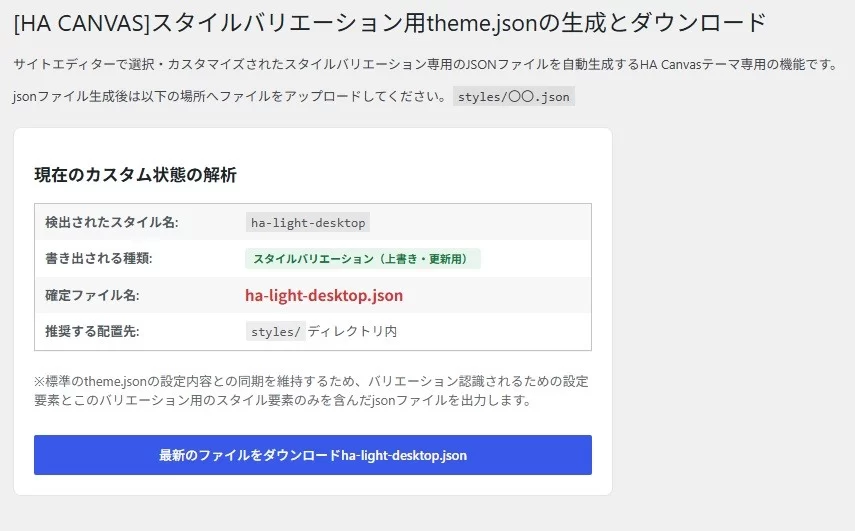
以上、ブロックテーマ用のスタイルバリエーションの追加方法でした。
おまけとして、スタイルバリエーション選択時のみに特定のスタイルシートを適用させる方法を紹介しておきますので参考にどうぞ。
特定のスタイルバリエーション用のスタイルシートを適用させる方法
サイトエディターはすべてのスタイルを指定できるわけでもありませんし、追加用のスタイルコードを書いてエクスポートするとjsonファイルの記述に何度も重複したコードが書き出されることがありますから、少なくともWordPress7.1段階では、スタイルシートとの併用がベストかと感じます。
以下のようにすることで、そのスタイルバリエーションを選択した際に特定のスタイルシートを読み込ませるということができますので、必要であれば実装しておくといいと思います。
スタイルバリエーション用のCSSを用意してテーマディレクトリに設置
以下のようにテーマディレクトリ内へスタイルバリエーション用のスタイルシートを設置します。
スタイルシートのファイル名はスタイルバリエーション用jsonと同一にします
- テーマディレクトリ
- assets
- css
- スタイルバリエーション名.css
- css
- assets
テーマのfunctions.phpへのコード追加
以下のコードをテーマのfunctions.phpへ追加します。
コードは HA Canvas テーマのものをそのまま記載しています。必要に応じて書き換え等を行ってください
/*** theme.jsonのsettings→custom→theme-info→current-slugで指定したスラグでスタイルを読み分け ***/
function ha_canvas_style_variation_enqueue_style(){
	// theme.json から現在のスラッグを取得(未設定なら ha-default をフォールバックに)
	$theme_info = wp_get_global_settings( array( 'custom', 'theme-info' ) );
	$slug = $theme_info['current-slug'] ?? 'ha-default';

	$rand = rand( 1, 99999999999 );

	// theme.jsonで指定したCSS変数によってスタイルシートを変更してエンキュー
	wp_enqueue_style(
		'ha-canvas-variation-style',
		get_theme_file_uri( "assets/css/{$slug}.css" ),
		array(),
		$rand
	);
}
add_action( 'enqueue_block_assets', 'ha_canvas_style_variation_enqueue_style');
設置したらスタイルコードを実際に記述して、そのスタイルバリエーションが選択された時のみスタイルが適用されるかを確認してください。
環境によってはキャッシュが効いて即時反映されないことがありますので、ブラウザーのキャッシュクリア(通常はページを表示させた状態で「Ctrl」+「F5」)を行ってみてください。

コメントを残す